

A practitioner focused framework for deciding what to localize, when to localize it, and how to connect localization to real user tasks.
Localization teams rarely have the luxury of translating everything at once.
There is always more content waiting. New product features are being released. Documentation is changing. Marketing wants campaign pages translated. Support needs troubleshooting content. Product teams want the UI ready for a new market.
Then comes the question: What should we localize first?
It is tempting to answer that question by looking at what is ready for translation, what was translated last time, or which team is asking most urgently. That can create a translation queue, but it does not necessarily create a better localized experience.
A more useful question is: Where does language create the most friction for our users?
"I have learned that localization becomes much easier to prioritize when you stop looking at a list of pages and start looking at what the user is trying to accomplish.
That shift changes how we think about localization.
Start with user friction, not content volume
A localization backlog can quickly become a list of files, pages, strings, and screenshots.
But users do not experience localization as a collection of files. They experience it as a journey.
A user might discover a product through a localized website, create an account through localized onboarding, complete an action in the product UI, look for documentation when they get stuck, and contact support if they still cannot move forward.
If only one part of that journey is localized, the experience can still feel incomplete.
CSA Research found that 76% of online shoppers surveyed across 29 countries preferred to buy products with information in their native language. The same research found that 40% would never buy from websites in other languages.
The lesson for localization teams is not that everything needs to be translated immediately. It is that language can influence whether users understand a product, trust it, complete an action, and continue using it.
Hear more from Rutva on the Agile Localization Podcast
A simple Localization Priority Score
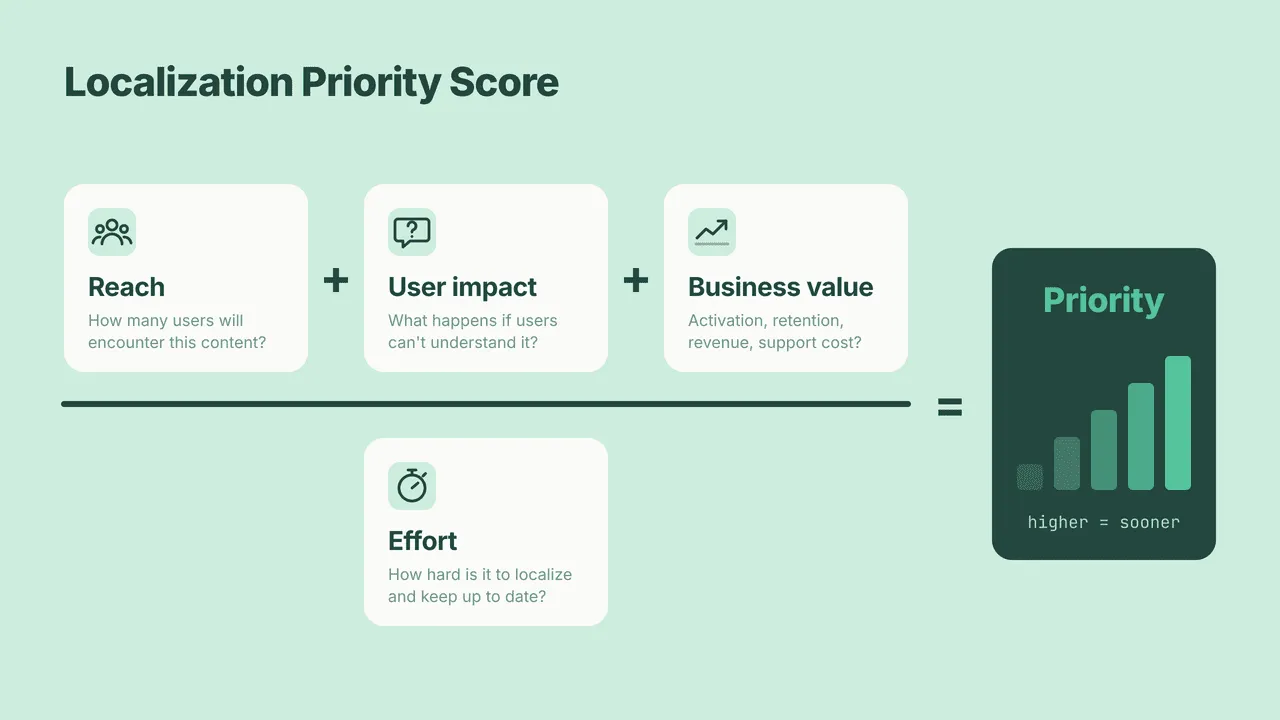
One practical way to make localization decisions more consistent is to score each piece of content across four dimensions:
(Reach + User Impact + Business Value) ÷ Effort
Use a simple scale from 1 to 5. The score is not meant to create mathematical certainty. It gives teams a common language for discussing priorities.
| Factor | Question to ask | Score |
|---|---|---|
| Reach | How many users are likely to encounter this content? | 1 to 5 |
| User impact | What happens if users cannot understand this content? | 1 to 5 |
| Business value | Does it influence acquisition, activation, adoption, retention, revenue, or support costs? | 1 to 5 |
| Effort | How difficult will it be to localize and maintain? | 1 to 5 |
Instead of saying, “This needs to be translated first because it is important”, you can ask why it is important and what evidence supports that decision.
Map localization to the user journey
Once you start looking at user journeys, the relationship between UI and documentation becomes much clearer.
Consider a user trying to connect an integration.
- Finding the integration
- Understanding what it does
- Starting the setup
- Authenticating
- Configuring settings
- Completing the connection
- Troubleshooting an error
- Finding reference information later
These touchpoints may belong to different teams. The UI may be owned by product. The setup guide may belong to documentation. Authentication messages may be maintained by engineering. Troubleshooting content may sit with support.
From the user’s perspective, however, these are all part of the same task.
"If a user needs several pieces of content to complete one task, I would look at that entire task when making a localization decision. The user does not care which team owns each piece.
Critical, high value, and supporting content
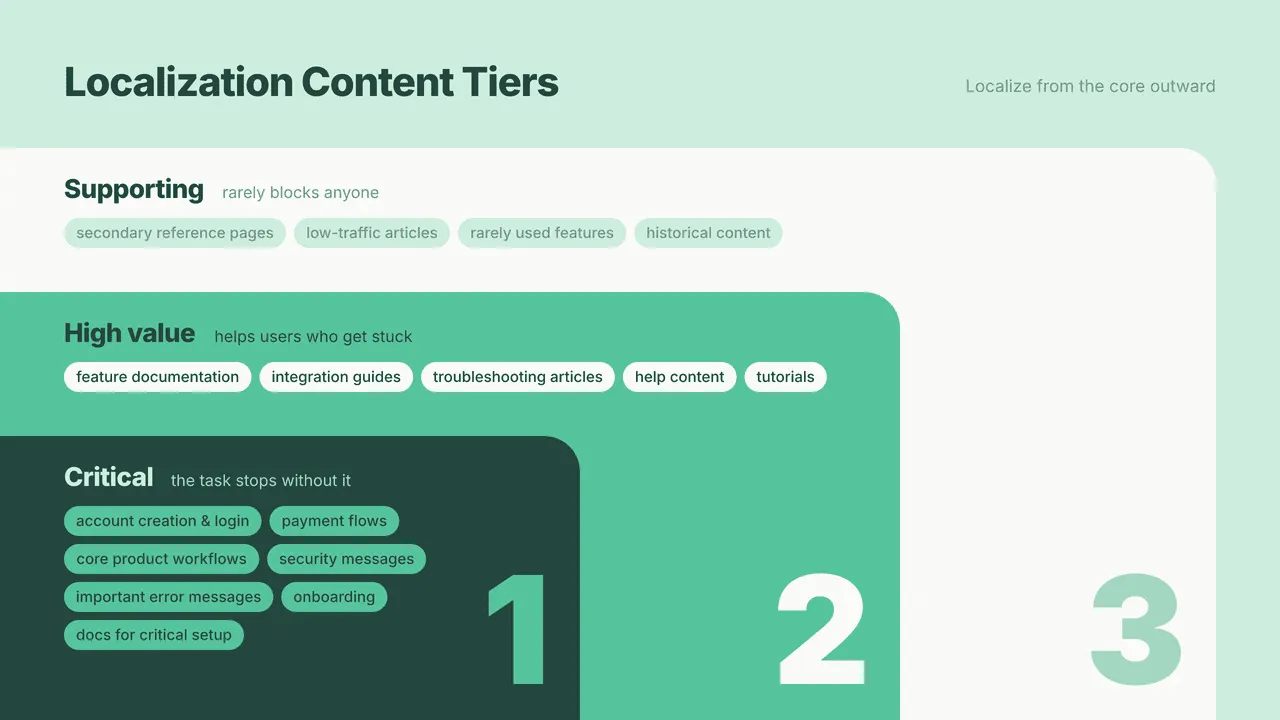
A simple three level model can help teams turn a large translation queue into something more manageable.
Critical content
Content users need to complete essential actions.
- Account creation and login
- Payment and subscription flows
- Core product workflows
- Security and privacy messages
- Important error messages
- Essential onboarding
- Documentation for critical setup tasks
High value content
Content that supports adoption and successful product use.
- Feature documentation
- Integration guides
- Troubleshooting articles
- Frequently used help content
- Product tutorials
- Common workflow documentation
Supporting content
Useful content that is less likely to block users.
- Secondary reference pages
- Low traffic articles
- Rarely used features
- Historical content
The goal is not to ignore supporting content. It is to make sure that it does not take priority over content that directly affects user success.
Use data instead of assumptions
Localization decisions become much easier when teams have evidence.
For documentation, look at page views, search queries, failed searches, support ticket topics, frequently visited articles, and common troubleshooting requests.
For the product, consider feature usage, activation rates, funnel drop offs, error frequency, regional usage, and conversion by market.
You may discover that the page your team considers most important is rarely used, while a small troubleshooting article receives thousands of visits. That is exactly the kind of insight a prioritization framework should uncover.
Localize complete user journeys, not isolated pages
One of the easiest mistakes is translating individual pages without checking whether the surrounding experience is available in the same language.
Imagine that a user sees a localized product page, enters the product, encounters English UI copy, and then finds an English setup guide.
Technically, localization has happened. From the user’s perspective, the journey is still fragmented.
This is particularly important for technical products. A localized integration guide is much more useful when the related UI labels, authentication messages, configuration instructions, and troubleshooting content use the same terminology.
I have also seen how localization workflows can become difficult to manage when teams rely heavily on spreadsheets and manually shared files. Before Crowdin, localization at Gantner India Pvt. Ltd. was managed through Google Sheets and Excel files.
Crowdin changes that workflow by bringing translation management, terminology, collaboration, and localization workflows into one environment.
For me, the glossary is particularly valuable because terminology is not just a translation problem. It is a product consistency problem.
"A glossary can save a team from having the same terminology discussion every time a new page or feature is translated. Once an important product term is agreed on, I want that decision to be reusable.
Prioritize by task, not just by page
This is one of the most useful changes a documentation team can make.
Instead of asking: Which pages should we translate?
Ask: Which user tasks should work completely in this language?
For example:
Task: Connect an integration
- Integration setup UI
- Setup documentation
- Authentication instructions
- Error messages
- Troubleshooting content
- Relevant reference documentation
UI copy versus documentation: What comes first?
There is no universal answer.
Sometimes the UI should come first because users cannot complete the workflow without understanding the product interface.
Sometimes documentation should come first because users rely heavily on setup or configuration instructions.
And sometimes both need to move together.
This becomes particularly important around product releases.
"One of the biggest challenges I have seen is that UI localization often happens toward the end of a release. By that point, documentation may already be written, screenshots may already be captured, and terminology may already be in use.
Bringing localization into the release conversation earlier can help teams identify these dependencies before they become last minute work.
Do not forget maintenance
Localization is not finished when a translation is approved.
Content changes. Screenshots change. Product terminology evolves. Features are renamed. UI strings are updated.
When prioritizing content, ask:
- How often does this content change?
- Who owns the source content?
- How will updates reach translators?
- Does the content contain screenshots?
- Does it depend on changing UI text?
- Is terminology already available in the glossary?
- Can parts of the workflow be automated?
A page that is easy to translate once but changes every week may require more ongoing effort than a larger page that remains stable for months.
Build a localization backlog, not a translation backlog
The difference may sound small, but it changes the way teams work.
A translation backlog says: Here are the files we need translated.
A localization backlog says: Here are the user experiences we need to make work in this market.
That backlog can contain markets, user journeys, content dependencies, business goals, and maintenance requirements.
It also creates a better conversation between localization, documentation, product, engineering, marketing, and support.
5 questions to ask
- Who is using this content? Understand the audience and the market.
- What are they trying to accomplish? Connect the content to a real user task.
- What happens if they do not understand it? Identify whether the language gap creates confusion, abandonment, support demand, or a blocked workflow.
- What does the business gain from localizing it? Consider acquisition, activation, adoption, retention, revenue, or support efficiency.
- How difficult will it be to localize and maintain? Look beyond the initial translation effort and consider the full lifecycle.
These questions will not produce a perfect score. They will give your team something more useful: a consistent way to discuss localization priorities.
Localization is a product decision
You do not need to translate everything to create a useful localized experience.
You need to understand where language matters most.
Start with the users. Look at their tasks. Follow the journey across UI, documentation, onboarding, and support. Bring data into the conversation. Consider both the initial translation effort and the work required to maintain it.
Most importantly, stop thinking of localization as a queue of content waiting to be translated.
Think of it as a product experience that needs to work for people in their language.
The question is not simply: “What should we translate?”
It is: “What should our users be able to accomplish in their language first?”
That is where a practical localization strategy starts.
Localize your product with Crowdin

Rutva Safi
Rutva Safi is a Senior Technical Writer with 11+ years of experience across software, product communication, and content strategy. She works with product and engineering teams to turn complex product knowledge into clear, useful experiences for users. An international speaker, podcast guest, and industry expert, she shares her insights through talks, podcasts, webinars, and industry discussions, with a focus on localization strategy, AI enabled content workflows, structured knowledge, and the evolving role of technical communicators.